
AD Health Monitor
Description
Section titled “Description”The AD Health Check Tool will run up to 27 diagnostics tests on each domain controller. Each diagnostic test will return a pass or a failure. This GUI tool makes it easy to check the health of your domain controllers.
Requirements
Section titled “Requirements”- It is recommended to run this tool on a domain controller. It can generate false positives if run on a client operating system.
List of Tests
Section titled “List of Tests”| Test Name | Short Description |
|---|---|
| Advertising | Checks whether each DC advertises its roles (DC, GC, KDC, etc.) and validates DsGetDcName behavior. |
| CheckSDRefDom | Validates that application directory partitions have correct msDS-SDReferenceDomain values. |
| CheckSecurityError | (Not run by default) Performs security checks: KDC reachability, DC object replication, Kerberos MTU issues, permissions, SPNs, SYSVOL/NETLOGON access, and more. |
| Connectivity | Verifies LDAP/RPC connectivity and DNS registration of the DSA. |
| CrossRefValidation | Validates crossRef objects in the configuration partition including nCName, dnsRoot, nETBIOSName, systemFlags, and orphaned replicas. |
| CutoffServers | Detects DCs missing valid replication connection objects (servers “cut off” from replication). |
| DcPromo | Runs prechecks for promoting a server to a DC (DNS config, locator records, dynamic updates); requires /DnsDomain args. |
| DFSREvent | Checks DFS Replication event logs for warnings or errors from the last 24 hours. |
| DNS | Runs comprehensive DNS health tests across the enterprise (requires /test:DNS). |
| FrsEvent | Checks File Replication Service (FRS) event logs for errors from the last 24 hours. |
| Intersite | Validates intersite replication configuration, ISTG behavior, and predicts KCC recovery time. |
| KccEvent | Queries KCC for errors/warnings in Directory Services event logs from last 15 minutes. |
| KnowsOfRoleHolders | Reports the DC’s knowledge of FSMO role holders (cross-checked when using /e). |
| LocatorCheck | Validates that DC locator SRV records can be resolved for forest/domain. |
| MachineAccount | Validates the DC’s computer account (exists in DC OU, correct flags, SPNs); same internal test as CheckSecurityError. |
| NCSecDesc | Checks permissions on naming contexts (schema, config) for replication/permission health. |
| NetLogons | Ensures access to SYSVOL/NETLOGON and that required privileges are configured. |
| ObjectsReplicated | Confirms key directory objects have replicated fully; additional objects can be tested with /objectdn. |
| OutboundSecureChannels | (Not run by default) Checks secure channels from DCs to specified domains (requires /testdomain). |
| RegisterInDNS | Tests whether the DC can register required locator DNS records and validates DNS zone status/dynamic updates. |
| Replications | Validates replication status for all naming contexts, reporting errors, latency, and disabled connections. |
| RidManager | Verifies RID Master availability and RID pool validity. |
| Services | Confirms critical AD-related services are running and set to proper startup types. |
| SysVolCheck | Verifies SYSVOL readiness via the SysVolReady registry key. |
| SystemLog | Checks System Event Log (last 60 minutes) for errors/warnings. |
| Topology | (Not run by default) Validates that replication topology is fully connected. |
| VerifyEnterpriseReferences | Validates enterprise-wide system reference attributes used by FRS/DFSR and replication infrastructure. |
| VerifyReferences | Checks system reference attributes for a single DC. |
| VerifyReplicas | Ensures application directory partitions are correctly instantiated on appropriate replica servers. |
How to
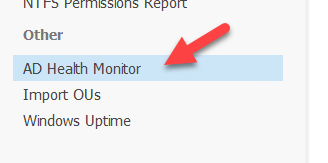
Section titled “How to”Step 1. Click on “AD Health Monitor”
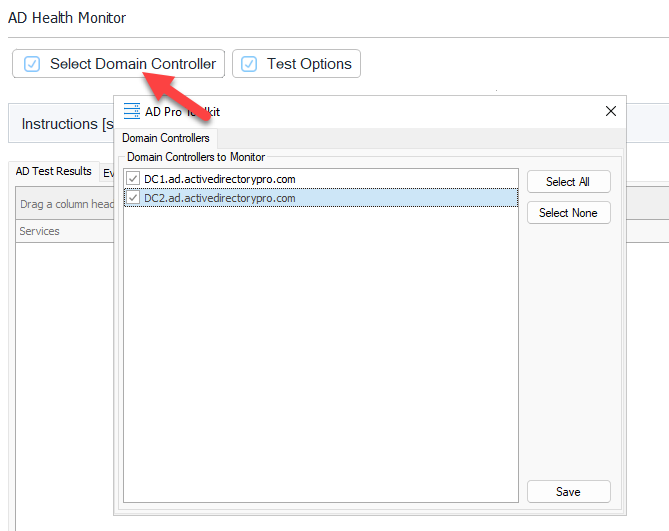
Step 2. Click the “Select Domain Controller” button and select the domain controllers you want to test.
Step 3. Click “Test Options” and select the type of test to run.
Note: Selecting “Comprehensive” results in longer test times.
Step 4. Click “Run” to start
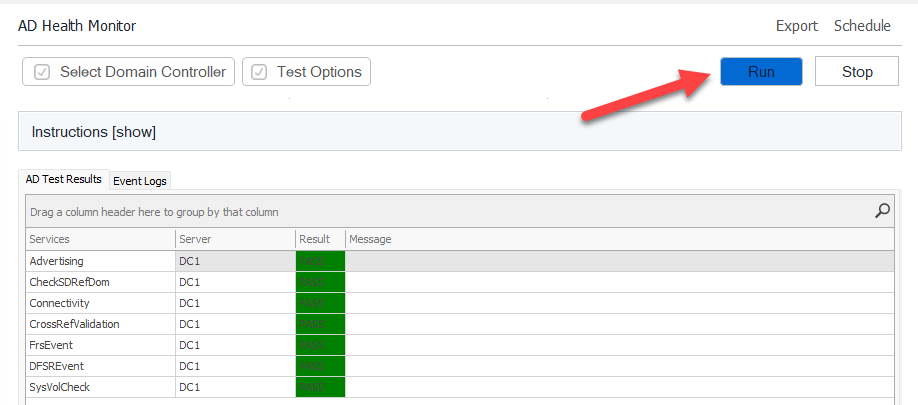
If a test fails you can click on “View Log File” to view the details.