
Active Directory Security Reports
Description
Section titled “Description”The AD Pro Toolkit includes a collection of pre-built security reports. These reports provide quick insights into account risks, privileged access, password issues, configuration weaknesses, and other security-relevant conditions across your AD environment. They help administrators identify vulnerabilities, audit compliance, and maintain a secure directory.
How to Run Security Reports
Section titled “How to Run Security Reports”- Click Reports > Security Reports
- Select a report and click the run button.
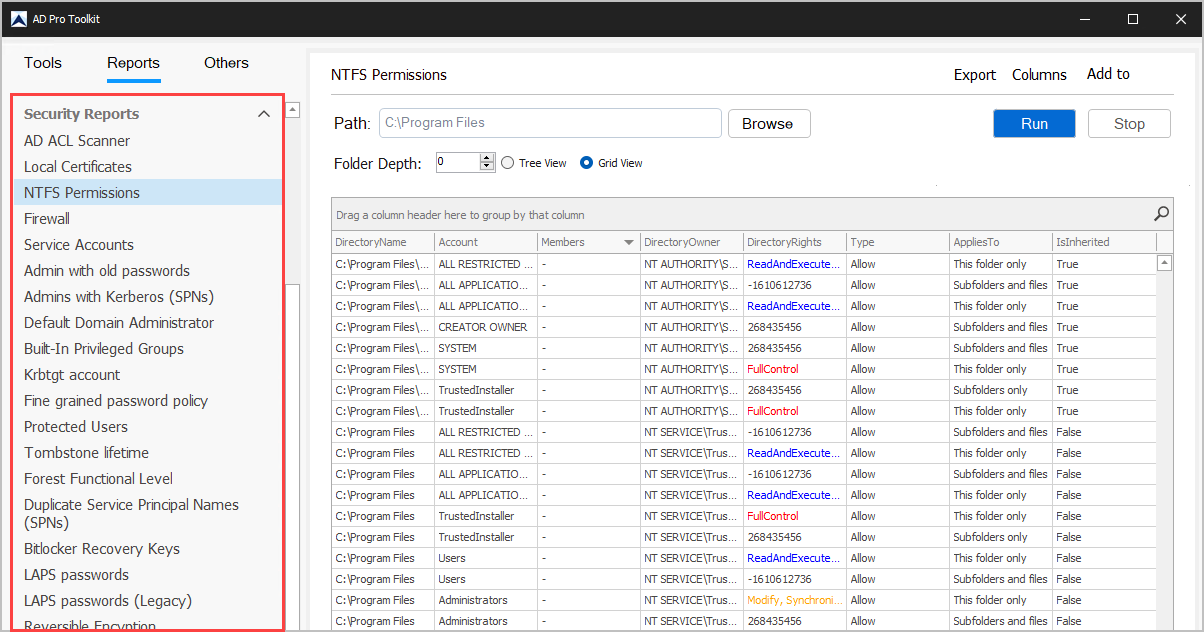
List of Security Reports
Section titled “List of Security Reports”| Report name | Description |
|---|---|
| AD ACL Scanner | Gets the ACLs on Active Directory objects. Shows delegated permissions. |
| Local Certificates | Scans remote computers to get locally installed certificates. |
| NTFS Permissions | Lists users and groups, folder access and permissions. |
| Firewall | Scan remote computers and gets the firewall status and rules. |
| Service Accounts | Scan remote computers and get schedule tasks and services. |
| Admin with old passwords | List of admins who have not changed their password in the last 180 days. |
| Admins with Kerberos (SPNs) | Reading ServicePrincipalName of the computer if it is the memberOf Domain Admins group. |
| Default Domain Administrator | Default administrator account, last logon and password reset date. |
| Built-In Privileged Groups | Enterprise Admins, Domain Admins, Administrators, Schema Admins, Group Policy Creator Owners. |
| Krbtgt account | Lists the password last set date and status for krbtgt account. |
| Fine grained password policy | Lists all fine grained password policies and settings. |
| Protected Users | List the members (users) of the Protected Users group. |
| Tombstone lifetime | Lists the Tombstone lifetime of the domain. |
| Forest Functional Level | Lists the forest functional level. |
| Duplicate Service Principal Names (SPNs) | Getting results from the SetSPN -X -F command. |
| Bitlocker Recovery Keys | Lists bitlocker recovery keys. |
| LAPS passwords | Lists the LAPS password for computer accounts. |
| LAPS passwords (Legacy) | Lists the LAPS password for computer accounts (old LAPS version). |
| Reversible Encryption | Lists users who store passwords using reversible encryption. |
| Use only Kerberos DES encryption | Lists users whose account option (Use only Kerberos DES encryption types for this account) is enabled. |
| Do not require kerberos preauthentication | Lists users whose account option (Do not require kerberos preauthentication) is enabled. |
| SID history | Lists users who have SID History. |