
Schedule Active Directory Reports
Description
Section titled “Description”The Active Directory Reporting Scheduler automates the generation and delivery of AD reports by allowing administrators to schedule recurring tasks. With customizable intervals and report selections, it ensures up-to-date insights are delivered automatically, reducing manual effort and helping maintain consistent visibility into your directory environment.
How to Schedule Active Directory Reports
Section titled “How to Schedule Active Directory Reports”Note: To schedule reports to be emailed you need to configure your email server settings.
Step 1. Click on Reports and Scheduler
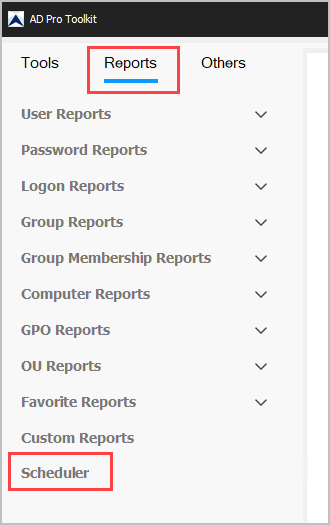
Step 2. Click the “Add” button.
Step 3. Configure Task Settings
- Type: Choose Reports
- Task: Name: Give the task a name
- Credentails: Click “Set” to enter the username and password to run the task.
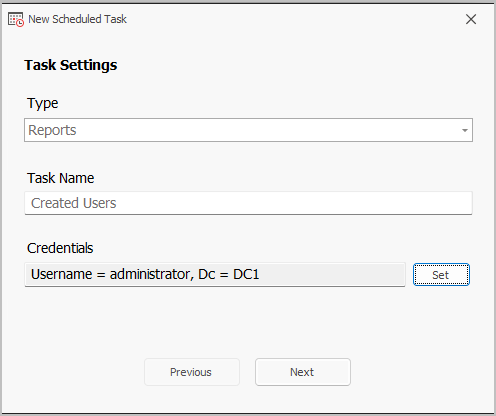
Click “Next”
Step 4. Configure Schedule Frequency
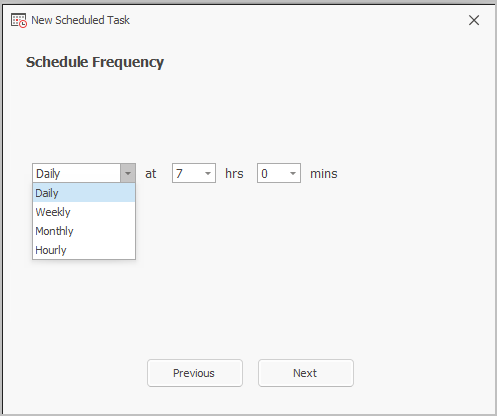
Click “Next”
Step 5. Configure Task Actions
- Select a Report Category and select a report
- Set the output options
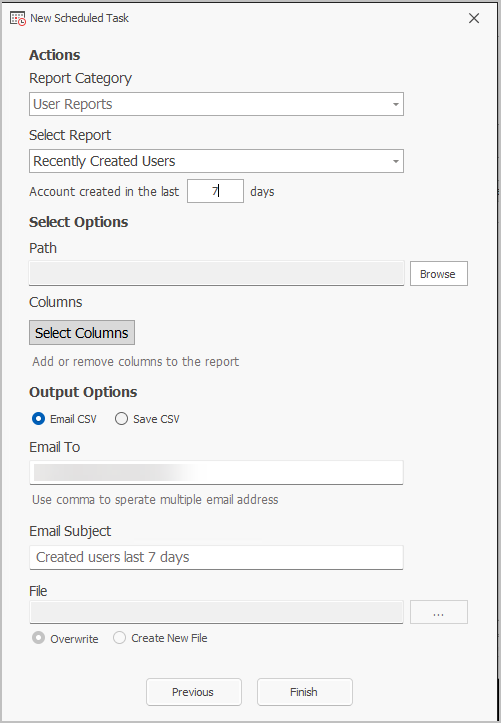
Click “Finish”