
Active Directory Group Reports
Description
Section titled “Description”The built-in group reports provides centralized visibility into all security and distribution groups within your Active Directory environment. Quickly list all AD groups, recently created, deleted, managed, not protected groups an much more. Whether you are troubleshooting access issues or ensuring least-privilege policies, our group reports delivers clear, actionable insights to help keep your directory secure, organized, and compliant.
How to run Groups Reports
Section titled “How to run Groups Reports”- Click Reports > Group Reports
- Select a report and click the “Run” button.
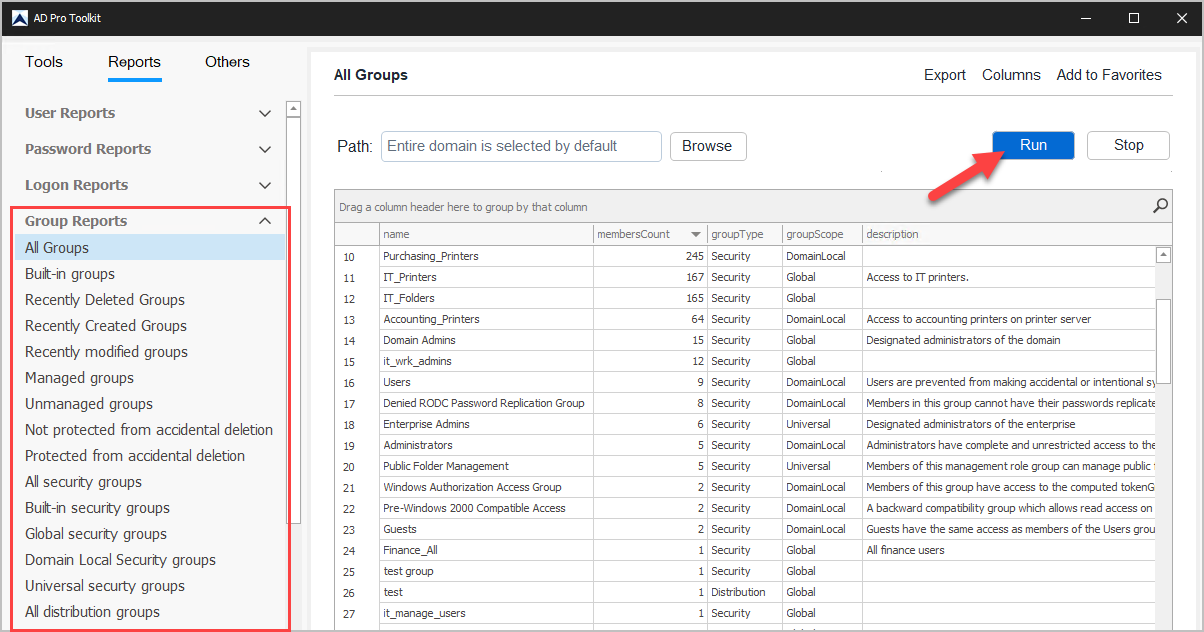
List of Group Reports
Section titled “List of Group Reports”| Report Name | Description |
|---|---|
| All Groups | List of all groups in the domain |
| Built-in groups | List of all default built-in groups |
| Recently Deleted Groups | List of groups deleted in the past ‘x’ days |
| Recently Created Groups | List of groups created in the past ‘x’ days |
| Recently modified groups | List of groups modified in the past ‘x’ days |
| Managed groups | List of groups that have Managed by set |
| Unmanaged groups | List of groups without Managed by set |
| Not protected from accidental deletion | List of group not protected from accidental deletion |
| Protected from accidental deletion | List of group that are protected from accidental deletion |
| All security groups | List of groups that are security type |
| Built-in security groups | List of all security groups in the domain |
| Global security groups | Group scope equals “Global” |
| Domain Local Security groups | Group scope equals “Domain local” |
| Universal security groups | Group scope equals “Universal” |
| All distribution groups | Group type equals “Distribution” |
| Empty distribution groups | Distribution groups that have no members |
| Global distribution groups | Group scope equals “Global” and group type equals “Distribution” |
| Domain Local distribution groups | Group scope equals “Domain local” and group type equals “Distribution” |
| Universal distribution groups | Group scope equals “Universal” and group type equals “Distribution” |